A new infrastructure for Agentic Analog and Mixed-Signal Design. LLM Agents drive Cadence Virtuoso instances — locally or remotely — turning tedious handcrafting into automated design flows.
Deep Virtuoso Integration
Control across Schematic, Layout, Maestro, and Spectre. Flexible programming: execute inline SKILL, load .il files, or use Python APIs.
Scalable Architecture
Multi-server, multi-session. Built for modern distributed design clusters with parallel simulations across servers and accounts.
AI-Native Design
CLI-first, ships with pre-defined agent skills, and uses resilient, profile-aware SSH routing for frequent agent interactions.
Comparison with skillbridge
| Feature | virtuoso-bridge-lite | skillbridge |
|---|---|---|
| Core mechanism | ipcBeginProcess + evalstring | ipcBeginProcess + evalstring |
| Local mode | Yes | Yes |
| Remote execution | SSH tunnel, jump host, auto-reconnect | Not supported |
| Calling style | String-based: execute_skill("...") | Pythonic: ws.db.open_cell_view_by_type(...) |
| Load .il files | client.load_il() | Not supported |
| Layout / schematic API | client.layout.create() / modify() context managers | Raw SKILL only |
| Spectre simulation | Built-in runner + PSF parser | Not supported |
| AI agent support | Skill files, CLI-first, command logging | Not designed for agents |
| Python ↔ SKILL types | String-based | Auto bidirectional mapping |
| IDE tab completion | No (not needed by agents) | Yes (Jupyter, PyCharm stubs) |
Both projects use the same Cadence SKILL IPC facility. The divergence is in what's built on top: skillbridge stays thin — a Pythonic RPC client. virtuoso-bridge-lite adds SSH remote access, high-level APIs, Spectre simulation, and an AI-agent-ready harness.
Architecture
| Component | Description |
|---|---|
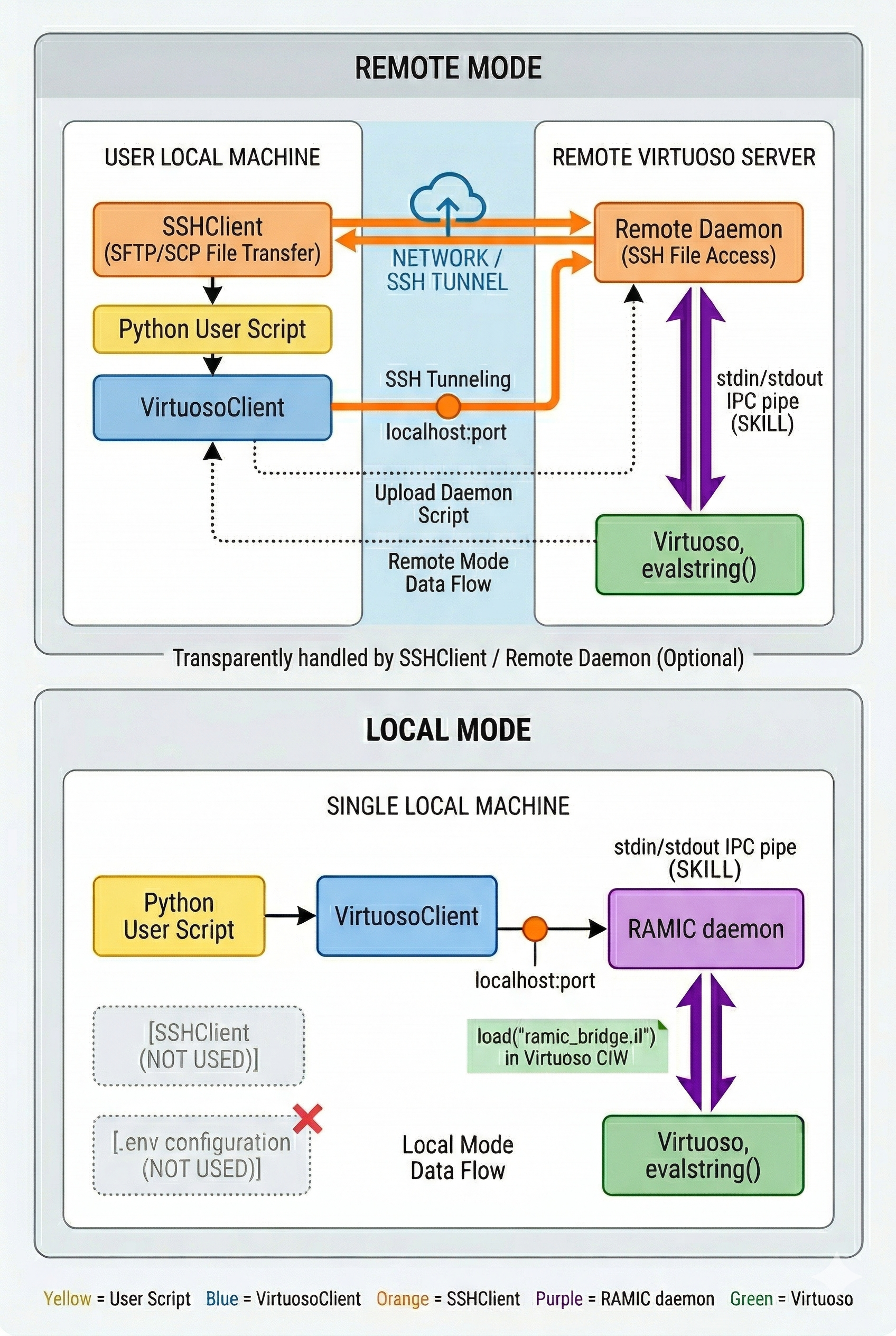
VirtuosoClient | Pure TCP SKILL client. Sends SKILL as JSON, gets results. No SSH awareness. |
SpectreSimulator | Runs standalone Spectre simulations locally or through SSH, then parses PSF ASCII results into Python data. |
SSHClient | Role-aware transport: OpenSSH or Paramiko for commands and files, plus a standalone OpenSSH -L daemon tunnel. Optional — bypassed in local mode. |
Fully decoupled: VirtuosoClient works with any TCP endpoint — SSH tunnel, VPN, direct LAN, or local. The GUI, deployment, daemon, and Spectre roles may share one host or resolve to separate hosts; legacy VB_REMOTE_HOST profiles remain compatible. See ADR 0001 for the host-role model.
Getting Started
Prerequisites
| SSH | ssh my-server must work without a password prompt |
| Virtuoso | A running Virtuoso process on the remote (or local) machine |
| Spectre | (Simulation only) spectre on PATH, or set VB_CADENCE_CSHRC |
Step-by-step setup
# 1. Install
uv venv .venv
source .venv/bin/activate
uv pip install -e .

# 2. Generate config (fills host/user/jump + port in one shot)
virtuoso-bridge init user@host -J user@jump-host
#   or `virtuoso-bridge init` for an empty template to edit manually

# 3. (only if step 2 left anything blank) edit ~/.virtuoso-bridge/.env
# VB_REMOTE_HOST=my-server
# VB_REMOTE_USER=username
# VB_REMOTE_PORT=65081     # auto-assigned by hashing VB_REMOTE_USER
# VB_LOCAL_PORT=65082
# Split-host environments may also set:
# VB_GUI_HOST=gui-host             # Virtuoso CIW / X11
# VB_DEPLOY_HOST=gui-host          # setup and daemon files
# VB_DAEMON_HOST=compute-host      # RAMIC tunnel endpoint
# VB_SPECTRE_HOST=compute-host     # standalone simulations
# VB_REMOTE_SCRATCH_ROOT=/shared/home/user/.virtuoso-bridge

# 4. Start the bridge
virtuoso-bridge start

# 5. Load SKILL in Virtuoso CIW (path printed by `virtuoso-bridge start`)
# load("/tmp/virtuoso_bridge_<remote_user>/<client_id>/virtuoso_bridge/virtuoso_setup.il")
# Or bootstrap the first load safely by selecting an explicit CIW:
virtuoso-bridge list-windows --top-level --json
virtuoso-bridge bootstrap --window WINDOW_ID

# 6. Verify
virtuoso-bridge status
# 7. Connect from Python
from virtuoso_bridge import VirtuosoClient
client = VirtuosoClient.from_env()
result = client.execute_skill("1+2")
print(result) # VirtuosoResult(status=SUCCESS, output='3')# — or skip Python entirely: run SKILL straight from the shell —
# One-liner — full VirtuosoResult JSON on stdout
virtuoso-bridge eval 'getCurrentTime()'
# Multi-line SKILL via heredoc (auto-wrapped in progn; returns the last form)
virtuoso-bridge eval --stdin <<'EOF'
let((libs)
libs = mapcar(lambda((l) l~>name) ddGetLibList())
printf("found %d libraries\n" length(libs))
libs)
EOF
# Whole .il file — uploaded automatically in SSH mode
virtuoso-bridge load my_script.ilJump host setup
# In .env — VB_REMOTE_HOST is where Virtuoso runs, NOT the jump host
VB_REMOTE_HOST=compute-host
VB_JUMP_HOST=jump-host
For command and file traffic, VB_SSH_BACKEND=paramiko reuses one authenticated SSH connection. Paramiko can also use an unauthenticated first-hop proxy such as VB_SSH_PROXY=socks5://127.0.0.1:10800. The daemon tunnel remains a standalone OpenSSH process so it can be monitored and restarted independently.
Multi-profile setup
# Default (no profile)
VB_REMOTE_HOST=server-a
VB_REMOTE_USER=user1

# Profile "worker1" — used with -p worker1
VB_REMOTE_HOST_worker1=server-b
VB_REMOTE_USER_worker1=user2
VB_SPECTRE_HOST_worker1=spectre-node-b
virtuoso-bridge start -p worker1
virtuoso-bridge status -p worker1Local mode (no SSH)
from virtuoso_bridge import VirtuosoClient

bridge = VirtuosoClient.local(port=65432)
bridge.execute_skill("1+2")
Set VB_REMOTE_HOST=localhost and run virtuoso-bridge start — it skips the SSH tunnel, deploys the bridge files locally, and prints the load(...) line for the CIW.
API Reference
VirtuosoClient — SKILL execution
| Method | Description |
|---|---|
execute_skill(code) | Run any SKILL expression, return result |
load_il(path) | Upload & load a .il file in Virtuoso |
execute_operations(cmds) | Run a batch of SKILL commands |
get_current_design() | Returns (lib, cell, view) of active cellview |
open_window(lib, cell) | Open a cellview in Virtuoso GUI |
save_current_cellview() | Save the active cellview |
test_connection() | Ping the daemon to check connectivity |
Layout editing
from virtuoso_bridge.virtuoso.layout import (
    layout_create_rect as rect,
    layout_create_path as path,
    layout_create_param_inst as inst,
    layout_create_via_by_name as via,
)

with client.layout.create("myLib", "myCell") as lay:
    lay.add(rect("M1", "drawing", 0, 0, 1, 0.5))
    lay.add(path("M2", "drawing", [(0,0),(1,0)], 0.1))
    lay.add(inst("tsmcN28", "nch_ulvt_mac", "layout", "M0", 0, 0, "R0"))
lay.add(via("M1_M2", 0.5, 0.25))| Method | Description |
|---|---|
lay.add(skill_cmd) | Queue a SKILL command (from ops functions) |
Schematic editing
from virtuoso_bridge.virtuoso.schematic import (
    schematic_create_inst_by_master_name as inst,
    schematic_create_pin as pin,
    schematic_label_instance_term as label,
)

with client.schematic.create("myLib", "myCell") as sch:
    sch.add(inst("analogLib", "vdc", "symbol", "V0", 0, 0, "R0"))
    sch.add(label("V0", "PLUS", "VDD"))
    sch.add(pin("VDD", 0, 1.0, "R0", direction="inputOutput"))
    sch.add_net_label_to_transistor("M0",
        drain_net="OUT", gate_net="IN",
source_net="VSS", body_net="VSS")| Method | Description |
|---|---|
sch.add(skill_cmd) | Queue a SKILL command (from ops functions) |
sch.add_net_label_to_transistor(...) | Label MOS D/G/S/B terminals |
Use create() for a clean cell and modify() for append/update work. The optional Python-side planner produces deterministic coordinates and constraint reports before mutation; see ADR 0002.
Spectre simulation
from pathlib import Path
from virtuoso_bridge.spectre import SpectreSimulator
from virtuoso_bridge.spectre.psf import frequency_hz, read_psf_ascii, result_file, vector

sim = SpectreSimulator.from_env(work_dir="./output")
result = sim.run_simulation("tb_inv.scs", {})
if not result.ok:
    raise RuntimeError(result.errors)

print(result.status)          # ExecutionStatus.SUCCESS
print(result.data.keys())     # ['time', 'VOUT', 'VIN', ...]
print(result.data["VOUT"][:5]) # first 5 voltage samples

# Strict accessors fail on ambiguous files, guessed keys, or malformed data.
raw = Path(result.metadata["output_dir"])
ac = read_psf_ascii(result_file(raw, "ac.ac"))
freq = frequency_hz(ac)
vout = vector(ac, "VOUT")
ADE Maestro (Assembler)
# Snapshot the focused maestro window — no session arg needed.
# Returns dict with raw_sections (list of (skill_probe, raw_output)
# tuples — no Python parsing of SKILL alists).
d = client.maestro.snapshot()
# Or also write the full disk dump (raw + filtered XMLs +
# state_from_skill.txt + per-point run files via tar). Files
# pulled are governed by snapshot_filter.yaml — edit to add/drop.
d = client.maestro.snapshot(output_root="output/")
# Pin a specific history instead of the auto-pick (mtime-first).
d = client.maestro.snapshot(output_root="output/", history="Interactive.160")

# Open / run / collect — GUI mode is required for run_and_wait
session = client.maestro.open_gui_session("myLib", "myTB")
history, status = client.maestro.run_and_wait(session=session, timeout=600)
history = history.strip('"')  # one budget covers run acceptance + completion
results = client.maestro.read_results(session, lib="myLib", cell="myTB", history=history)
client.maestro.export_waveform(session, 'dB20(mag(VF("/OUT")))', "gain.txt",
    history=history, precision=12, width=20, number_notation="none")
client.maestro.close_gui_session(session, save=False)
SSHClient — independent SSH layer
from virtuoso_bridge import SSHClient, VirtuosoClient

# Remote mode
tunnel = SSHClient.from_env()
tunnel.warm()
bridge = VirtuosoClient.from_tunnel(tunnel)

# Local mode
bridge = VirtuosoClient.local(port=65432)
File transfer and shell
| Method | Description |
|---|---|
upload_file(local, remote) | Upload a file to the remote machine |
download_file(remote, local) | Download a file from the remote machine |
run_shell_command(cmd) | Run a shell command on the remote host via SKILL csh() |
CLI commands
| Command | Description |
|---|---|
virtuoso-bridge init [user@host] [-J user@jump] [--force] | Write ~/.virtuoso-bridge/.env; arguments fill host/user/jump, --force overwrites an existing file |
virtuoso-bridge start [-p PROFILE] [--bind-venv] | Start SSH tunnel + deploy daemon. With -p PROFILE --bind-venv also binds the active virtualenv to that profile, so subsequent naked from_env() calls in the same venv resolve to it. |
virtuoso-bridge status | Check tunnel, daemon identity/hostname, and Spectre executable availability |
virtuoso-bridge restart | Restart SSH tunnel and refresh the deployed daemon setup |
virtuoso-bridge stop | Stop tunnel |
virtuoso-bridge profile show NEW | Print the resolved profile (and where it came from: explicit / env / runtime --env file / venv binding / user ~/.virtuoso-bridge/.env / default), plus the venv binding path. |
virtuoso-bridge profile bind PROFILE --venv NEW | Pin the active virtualenv to PROFILE by writing $VIRTUAL_ENV/.virtuoso-bridge-profile. Naked VirtuosoClient.from_env() / SpectreSimulator.from_env() calls in that venv then resolve to this profile. Explicit profile= and CLI -p still take precedence. |
virtuoso-bridge profile clear --venv NEW | Remove the active virtualenv's profile binding. |
virtuoso-bridge windows | List Virtuoso windows + focused session |
virtuoso-bridge snapshot | Dump focused maestro's SKILL probe sections to stdout |
virtuoso-bridge snapshot -o ROOT [--history NAME] | Full disk dump of the focused session to ROOT/<ts>__<lib>__<cell>/: raw + filtered setup XMLs, state_from_skill.txt, latest-run per-point files. --history pins a specific maestro history (e.g. Interactive.160); otherwise auto-picks by mtime. File whitelist lives in virtuoso/maestro/snapshot_filter.yaml — edit to reshape the dump (no code change). |
virtuoso-bridge screenshot [TARGET] [-o PATH] | Capture the CIW (default), current window, a view name, or an explicit window number; defaults to the user artifact screenshots directory. |
virtuoso-bridge load FILE.il NEW | Run a .il file in the live Virtuoso session — uploads the file in SSH mode and emits the full VirtuosoResult as JSON on stdout. Errors keep the original file/line (no temp-wrapper noise), so it pairs cleanly with VS Code tasks.json for one-keystroke SKILL iteration. |
virtuoso-bridge eval 'EXPR' / eval --stdin NEW | One-liner / heredoc companion to load. Multi-statement input is auto-wrapped in progn(...); --stdin sidesteps shell quoting for snippets with embedded quotes/parens. |
virtuoso-bridge dismiss-dialog | X11 rescue path — finds known blocking Virtuoso GUI dialogs and dismisses them outside the SKILL channel. |
virtuoso-bridge list-windows --top-level --json | Deduplicated X11 top-level Virtuoso frames, suitable for explicit CIW selection. Omit --top-level for the full child-window diagnostic view. |
virtuoso-bridge bootstrap --window WINDOW_ID | Safely type and submit the generated first-load command into an explicitly selected CIW; rejects non-CIW windows and verifies daemon identity afterward. |
virtuoso-bridge dismiss-window WINDOW_ID --action enter | Explicit X11 recovery path for a window ID returned by list-windows. |
virtuoso-bridge license | Check Spectre license availability on the remote. |
virtuoso-bridge export-visio LIB CELL -o OUT.vsdx | Windows + pywin32 path: render a Virtuoso schematic into Microsoft Visio. Defaults skip the MOS body pin B; --include-body-pins keeps it, --exclude-net/--exclude-pin repeatable for finer filtering. |
virtuoso-bridge skill-find <query> NEW | Search SKILL functions by name (fuzzy / prefix / suffix / exact / regex). Returns matching function names from the Virtuoso SKILL index. |
virtuoso-bridge doc-search <query> | Search installed Cadence HTML/text documentation and topic maps. Use --doc-root for explicit local/offline roots, or omit it to search through the active bridge profile. |
virtuoso-bridge skill-info <fn> NEW | Get detailed More Info documentation for a specific SKILL function — syntax, description, arguments, and return value. |
What snapshot -o pulls
One command dumps the focused maestro session's setup and the latest run's per-point files to a timestamped folder:
# auto-pick newest history
virtuoso-bridge snapshot -o output

# or pin a specific history (e.g. side-by-side comparison of two runs)
virtuoso-bridge snapshot -o output --history Interactive.160
Layout of the output directory:
output/<YYYYMMDD_HHMMSS>__<lib>__<cell>/
├── maestro.sdb, active.state                    # raw Cadence files
├── state_from_sdb.xml                           # sdb filtered (~10× smaller)
├── state_from_active_state.xml                  # active.state filtered
├── state_from_skill.txt                         # SKILL-probe setup summary
└── <history>/
    ├── <history>.{log,rdb,msg.db}               # run-level (rdb/msg.db are SQLite)
    └── <pt>/<tb>/
        ├── netlist/  → netlist, input.scs, qpInformation.ils, exprOutputs.json, paramInfo.ils
        └── psf/      → spectre.out, logFile, dcOp.dc, *.ac, *.tran, *.noise, ...
Per-point netlist/ keeps the 5 files that describe the runnable testbench and outputs (main SPICE netlist, testbench top-level, SKILL and JSON output-expression definitions, corner label). psf/ keeps stdout + logs + non-binary analysis results.
File selection is governed by virtuoso/maestro/snapshot_filter.yaml — every entry carries a per-file tag ([KEEP], [REDUNDANT], [SCAFFOLDING], [METADATA], [DEBUG-ONLY], [GUI-CONFIG], [RARELY], [NEVER]). Uncomment a line to add a file, comment it to skip. No package reinstall needed; the YAML is reread on every snapshot call.
Deliberately not pulled, regardless of YAML: *.raw binary waveforms, wavedb/, and PDK info dumps (modelParameter.info, primitives.info.*). Read scalar output tables with client.maestro.read_results() and export waveform text with client.maestro.export_waveform() instead of copying the binaries.
Examples
| Category | Example | Description |
|---|---|---|
| Basic | 00_ciw_output_vs_return.py | Compare CIW print vs SKILL return value |
01_execute_skill.py | Run SKILL expressions (Hello World) | |
02_ciw_print.py | Print to Virtuoso CIW | |
03_load_il.py | Load .il file into Virtuoso | |
04_list_library_cells.py | Enumerate libraries and cells | |
05_harvest_library.py | Harvest library metadata into structured output | |
05_multiline_skill.py | Execute multi-line SKILL code | |
06_screenshot.py | Capture window screenshot and download | |
07_sanitize_on_download.py | Download remote file with path sanitization | |
08_library_management.py | Create and inspect libraries, categories, and cells | |
| Layout | 01_create_layout.py | Create layout with NMOS/PMOS/CFMOM instances |
02_add_polygon.py | Add polygon shapes | |
03_add_via.py | Place vias | |
04_multilayer_routing.py | M2-M7 multi-layer routing | |
05_bus_routing.py | 8-bit bus wiring | |
06_read_layout.py | Read back layout geometry | |
07_delete_shapes_on_layer.py | Delete shapes on a specific layer | |
08_clear_routing.py | Clear routing from a layout | |
09_clear_current_layout.py | Clear the current layout entirely | |
10_delete_cell.py | Delete a layout cell | |
11_read_summary.py | Read layout summary | |
12_layer_visibility.py | Toggle layer visibility | |
13_select_and_delete.py | Select shapes and delete | |
14_mosaic_and_nets.py | Mosaic instances and net assignment | |
15_export_gds.py | Export a layout to GDS with fast-failure log polling | |
| Schematic | 01a_create_rc_stepwise.py | Create RC circuit step by step |
01b_create_rc_load_skill.py | Create RC via .il script injection | |
02_read_connectivity.py | Read nets, pins, instances | |
03_read_instance_params.py | Read instance parameters | |
04_test_set_instance_params_analoglib.py | Set instance parameters (analogLib) | |
05_rename_instance.py | Rename an instance | |
06_delete_instance.py | Delete an instance | |
07_delete_cell.py | Delete a schematic cell | |
08_import_cdl_cap_array.py | Import CDL netlist via spiceIn | |
09_create_pins.py | Create schematic pins | |
10_create_wire.py | Create wires between pins | |
11_read_schematic_unified.py | Unified schematic read (instances + nets + pins) | |
12_plan_differential_pair.py | Plan a deterministic differential-pair schematic without mutating Virtuoso | |
| Symbol | 01_rc_create_with_symbol.py | Create RC circuit with auto-generated symbol |
02_bus10_create_with_symbol.py | Create 10-bit bus with symbol | |
03_manual_symbol_semantics.py | Create a manual symbol with explicit semantic pin mapping | |
| Maestro | 01_read_focused_maestro.py | snapshot() of focused maestro (in-memory, JSON to stdout) |
02_snapshot_with_metrics.py | Full disk dump (snapshot -o ROOT) of focused maestro | |
03_bg_open_read_close_maestro.py | Background open/close + read (no GUI window) | |
04_gui_open_snapshot_close.py | GUI open → snapshot → close (owns lifecycle) | |
05_gui_session_lifecycle.py | open_gui_session / close_gui_session lifecycle test | |
06a_rc_create.py | Create Maestro test for RC filter (auto-timestamped cell) | |
06b_rc_simulate_and_read.py | Run simulation in GUI mode, read the exact history, export waveforms | |
07_ensure_maestro_view.py | Ensure a maestro view exists before operating | |
08_set_simulator_mode.py | Set simulator mode (APS/AXS/spectre) | |
09_export_sweep_subpoints.py | Export parametric sweep sub-point results | |
| Spectre | 01_inverter_tran.py | CMOS inverter transient simulation |
01_veriloga_adc_dac.py | 4-bit ADC/DAC with Verilog-A | |
02_cap_dc_ac.py | RC filter DC+AC frequency response | |
03_check_license.py | Check Spectre license availability | |
04_strongarm_pss_pnoise.py | StrongArm comparator PSS+Pnoise | |
05_parallel_sweep.py | Parallel parameter sweep across servers |