
Guide使用文档
Setup, configuration, Python and CLI use, and the parts for coding agents.安装、配置、Python 与命令行用法,以及给编程智能体的部分。
Overview概览
Virtuoso Bridge lets AI agents drive Cadence Virtuoso and Spectre, locally or on a remote server, through Python, SKILL or the command line.Virtuoso Bridge 让 AI 智能体通过 Python、SKILL 或命令行操作 Cadence Virtuoso 与 Spectre,可以在本机,也可以在远程服务器上。
Lite by default. Spectre execution and PDK/CDF callbacks are the core, for GUI-equivalent electrical results with matching netlists, models and options. Common schematic, symbol and GDS operations get lightweight wrappers; anything else goes through raw SKILL. Multi-server, multi-account and process configuration are optional, never a prerequisite for the one-host workflow.默认轻量。核心是 Spectre 执行与 PDK/CDF 回调,保证网表、模型和选项一致时得到与 GUI 相同的电学结果。常用的原理图、符号和 GDS 操作有轻量封装,其余都可以直接写 SKILL。多服务器、多账号与工艺配置都是可选项,单主机的常规用法不需要它们。
- Run inline SKILL, load
.ilfiles, or use the Python APIs.执行内联 SKILL、加载.il文件,或使用 Python API。 - Four design domains: schematic editing, layout generation, Maestro simulation setup, and standalone Spectre with PSF ASCII parsing.四个设计领域:原理图编辑、版图生成、Maestro 仿真设置,以及解析 PSF ASCII 结果的独立 Spectre。
- Deterministic schematic planning: explicit connectivity plus grid, polarity-row, differential-pair, pin-column and output-stage constraints.确定性的原理图规划:显式连接关系,加上网格、极性行、差分对、引脚列和输出级约束。
- Exact schematic recreation across PDKs through explicit process maps, symbol-pin audits, readback checks and GUI screenshots.跨 PDK 精确复现原理图:显式工艺映射、符号引脚核对、回读校验和 GUI 截图。
- Optional SOS cellview control: status, checkout, cancel, checkin and registration, with dry runs and post-state checks.可选的 SOS cellview 管理:状态、检出、取消检出、检入和注册,支持试运行与结果核对。
- Optional scale-out: several design servers, each with its own tunnel, and parallel simulations across servers and accounts.可选的横向扩展:连接多台设计服务器,各自独立隧道,并可跨服务器和账号并行仿真。
- Built for coding agents: CLI-first lifecycle (
start/status/restart), agent skill files inskills/, and role-aware SSH routing.为编程智能体设计:命令行优先的生命周期(start/status/restart)、skills/里的智能体技能文件,以及按角色区分的 SSH 路由。 - Client on macOS, Windows and Linux (CI covers Linux and Windows); the Virtuoso side runs on Linux.客户端支持 macOS、Windows 和 Linux(CI 覆盖 Linux 与 Windows);Virtuoso 端运行在 Linux 上。
How it compares with skillbridge: see the table on the home page.与 skillbridge 的区别见首页的对比表。
Choose your setup选择使用方式
| You want to…你想要… | Use使用 | Needs需要 |
|---|---|---|
| Drive Virtuoso on a remote EDA server操作远程 EDA 服务器上的 Virtuoso | Remote mode远程模式 | SSH access, running Virtuoso, load(...) in the CIWSSH 访问、正在运行的 Virtuoso、在 CIW 中执行 load(...) |
| Drive Virtuoso on this machine操作本机上的 Virtuoso | Local mode本机模式 | Running Virtuoso, VB_REMOTE_HOST=localhost正在运行的 Virtuoso、VB_REMOTE_HOST=localhost |
| Run Spectre from netlists从网表运行 Spectre | Spectre simulatorSpectre 仿真器 | spectre on PATH, or VB_CADENCE_CSHRCspectre 在 PATH 中,或设置 VB_CADENCE_CSHRC |
| Run reproducible optimization workflows运行可复现的优化流程 | Optimizer skilloptimizer 技能 | Spectre/OCEAN setup, requirement filesSpectre/OCEAN 环境、需求文件 |
| Let a coding agent operate Cadence让编程智能体操作 Cadence | Agent skills智能体技能 | Link skills/ into the agent's skill directory (below)把 skills/ 链接到智能体的技能目录(见下文) |
SKILL execution and Spectre simulation are independent: you can run Spectre without the SKILL bridge, and use the SKILL bridge without Spectre.SKILL 执行与 Spectre 仿真彼此独立:不用 SKILL 桥也能跑 Spectre,不用 Spectre 也能用 SKILL 桥。
Advanced: audit existing profiles with virtuoso-bridge profile list --json, or select a POSIX sh site environment with VB_CADENCE_ENV_SHELL=sh (default csh). See profile audit.进阶:用 virtuoso-bridge profile list --json 审查已有配置,或用 VB_CADENCE_ENV_SHELL=sh 选择 POSIX sh 站点环境(默认 csh)。见 profile audit。
Install and connect安装与连接
# 0. Get the source
git clone https://github.com/Arcadia-1/virtuoso-bridge-lite.git
cd virtuoso-bridge-lite

# 1. Install in a virtual environment
uv venv .venv
source .venv/bin/activate
uv pip install -e .

# 2. Create ~/.virtuoso-bridge/.env
virtuoso-bridge init user@host [-J user@jump-host]
# or: virtuoso-bridge init   (empty template; set VB_REMOTE_HOST yourself)

# 3. Start and verify
virtuoso-bridge start     # starts the tunnel and prints the CIW load(...) line
virtuoso-bridge status    # tunnel, Virtuoso daemon and Spectre availability
On Windows PowerShell, activate with .\.venv\Scripts\Activate.ps1. Then paste the printed load(...) line into the Virtuoso CIW you want to drive.Windows PowerShell 下用 .\.venv\Scripts\Activate.ps1 激活。然后把打印出的 load(...) 粘贴到要控制的 Virtuoso CIW。
Optional X11 bootstrap: pick one top-level CIW explicitly and inject only the generated setup command. bootstrap refuses windows that are not a CIW and never accepts arbitrary SKILL.可选的 X11 自动加载:先明确选定一个顶层 CIW,只注入生成的 setup 命令。bootstrap 会拒绝不是 CIW 的窗口,也不接受任意 SKILL。
virtuoso-bridge list-windows --top-level --json
virtuoso-bridge bootstrap --window 0x3000012
Local mode本机模式
When Virtuoso runs on the same machine, set VB_REMOTE_HOST=localhost: no SSH, and the setup uses the local Python. Details: connection guide.Virtuoso 在本机运行时设置 VB_REMOTE_HOST=localhost:不走 SSH,setup 使用本机 Python。详见 connection guide。
Which .env is used使用哪个 .env
Python entry points load the nearest parent .env that sets a bridge host role (VB_REMOTE_HOST, VB_GUI_HOST, VB_DAEMON_HOST…) or VB_LOCAL_PORT, with override=True. That can switch a long-lived process between local and remote mode, so pin the file before creating a client when you embed the bridge:Python 入口会加载最近的上级目录中设置了桥接主机角色(VB_REMOTE_HOST、VB_GUI_HOST、VB_DAEMON_HOST…)或 VB_LOCAL_PORT 的 .env,并且 override=True。这可能让长期运行的进程在本机/远程模式之间切换,所以嵌入使用时先固定文件再创建客户端:
from virtuoso_bridge.env import set_runtime_env_file

set_runtime_env_file("/path/to/virtuoso-bridge.env")
Run SKILL执行 SKILL
from virtuoso_bridge import VirtuosoClient

client = VirtuosoClient.from_env()
client.execute_skill("1+2")  # VirtuosoResult(status=SUCCESS, output='3')
Or skip Python and run SKILL from the shell:也可以不写 Python,直接在命令行执行 SKILL:
# One-liner: full VirtuosoResult JSON on stdout
virtuoso-bridge eval 'getCurrentTime()'

# Multi-line SKILL via heredoc (wrapped in progn; returns the last form)
virtuoso-bridge eval --stdin <<'EOF'
let((libs)
  libs = mapcar(lambda((l) l~>name) ddGetLibList())
  printf("found %d libraries\n" length(libs))
  libs)
EOF

# Whole .il file, uploaded automatically in SSH mode
virtuoso-bridge load my_script.il
Useful first commands once the bridge is up:桥接启动后常用的几个命令:
virtuoso-bridge windows       # list open Virtuoso windows
virtuoso-bridge screenshot    # screenshot the CIW into the artifact directory
virtuoso-bridge export-visio MyLib MyCell -o MyCell.vsdx   # Windows + Visio
Schematic, layout and Spectre原理图、版图与 Spectre
Operation-scoped schematic diagnostics: only messages from this schCheck/dbSave, with a blocking modal reported separately instead of stale CIW history.只针对本次操作的原理图诊断:只收集这次 schCheck/dbSave 的消息,阻塞弹窗单独报告,不混入旧的 CIW 历史。
report = client.schematic.check_and_save("myLib", "myCell")
print(report.status, report.check_error_count, report.check_warning_count)
for diagnostic in report.diagnostics:
    print(diagnostic.severity, diagnostic.code, diagnostic.message)
Recreate existing drawings across PDKs with the exact-coordinate manifest workflow; it never guesses devices or placement. JSON contracts and a runner: examples/01_virtuoso/schematic_manifest.用精确坐标的 manifest 流程在多个 PDK 上复现已有原理图,不会猜测器件或摆放。JSON 约定和完整脚本见 examples/01_virtuoso/schematic_manifest。
result = client.schematic.import_manifest(
    "source.json",
    "process-map.json",
    processes=["pdk180", "pdk28"],
)
client.schematic.capture_import_result(result, "output/evidence")
Standalone Spectre with strict PSF ASCII helpers, so missing files, keys or shapes fail fast instead of being guessed:独立 Spectre 与严格的 PSF ASCII 读取函数:文件、键名或数据形状不对时直接报错,不做猜测:
from pathlib import Path
from virtuoso_bridge.spectre import SpectreSimulator
from virtuoso_bridge.spectre.psf import frequency_hz, read_psf_ascii, result_file, vector

result = SpectreSimulator.from_env(work_dir="output").run_simulation("tb.scs")
if not result.ok:
    raise RuntimeError(result.errors)
raw_psf = Path(result.metadata["output_dir"])
ac = read_psf_ascii(result_file(raw_psf, "*.ac"))
frequency = frequency_hz(ac)
vout = vector(ac, "VOUT") # exact raw PSF key; missing or invalid data raisesMaestro snapshotsMaestro 快照
Pull the focused Maestro session's setup and latest-run artifacts into a local folder:把当前聚焦的 Maestro 会话的设置和最近一次运行的产物拉到本地目录:
virtuoso-bridge snapshot -o output                              # newest history
virtuoso-bridge snapshot -o output --history Interactive.160 # a specific historyoutput/20260422_142137__MyLib__myTB/
├── maestro.sdb, active.state raw Cadence files
├── state_from_sdb.xml, state_from_active_state.xml filtered, high-signal
├── state_from_skill.txt SKILL-probe setup summary
└── Interactive.N/
├── Interactive.N.{log,rdb,msg.db} run level (rdb = SQLite)
└── <pt>/<tb>/
├── netlist/ netlist, input.scs, qpInformation.ils, exprOutputs.json, paramInfo.ils
└── psf/ spectre.out, logFile, dcOp.dc, *.ac, *.tran, ...Each point keeps the five netlist files that describe the runnable design, plus stdout, logs and non-binary results. The rules live in snapshot_filter.yaml; comment lines in or out to change them. Binary waveforms are never pulled; read scalar results with client.maestro.read_results().每个点只保留描述可运行设计的 5 个网表文件,以及 stdout、日志和非二进制结果。规则在 snapshot_filter.yaml 里,注释或取消注释即可调整。二进制波形不会拉取,标量结果用 client.maestro.read_results() 读取。
Shared CIW共享 CIW
When people also use the CIW, opt into client.dialogs.enable_guard(protect_inflight=True) with an upgraded daemon. A request that meets a popup returns a recovery handle instead of interrupting Virtuoso or retrying; after the user resolves the popup, read the original result with client.requests.receipt(handle). This mode is off by default.有人同时在用 CIW 时,配合新版 daemon 开启 client.dialogs.enable_guard(protect_inflight=True)。遇到弹窗的请求会返回一个恢复句柄,不会打断 Virtuoso,也不会自动重试;用户处理完弹窗后,用 client.requests.receipt(handle) 取回原请求的结果。此模式默认关闭。
Closing an informational popup is also opt-in: a single-use visual approval bound to the exact CIW and window, with no automatic key injection or forced close.关闭提示类弹窗同样需要显式开启:一次性的可视化确认,绑定到具体的 CIW 和窗口,不会自动注入按键或强制关闭。
Requirements and limits: shared CIW dialogs.部署要求与限制见 shared CIW dialogs。
Configuration配置
Split GUI and daemon hostsGUI 与 daemon 分机部署
VB_REMOTE_HOST stays the simple one-host setting. Where Virtuoso runs on a GUI/login host but ipcBeginProcess() starts the daemon on a compute host, set the roles explicitly:VB_REMOTE_HOST 仍是最简单的单主机设置。如果 Virtuoso 跑在 GUI/登录主机上,而 ipcBeginProcess() 把 daemon 启动在计算主机上,就显式配置各角色:
VB_GUI_HOST=gui-host-a
VB_DEPLOY_HOST=gui-host-a
VB_DAEMON_HOST=compute-host-b
VB_SPECTRE_HOST=compute-host-b
VB_REMOTE_USER=user
VB_JUMP_HOST=gui-host-a

# Must be readable from the CIW and daemon host; /tmp is often isolated.
VB_REMOTE_SCRATCH_ROOT=/home/user/.virtuoso-bridge
Defaults: deployment follows the GUI host, Spectre follows the legacy/daemon host, and the jump host is skipped when the target is the jump host itself. status reads a daemon identity file written from the CIW banner, so it can diagnose a daemon/tunnel host mismatch even when the TCP endpoint is wrong.默认:部署主机跟随 GUI 主机,Spectre 跟随旧版/daemon 主机;目标本身就是跳板机时会自动跳过跳板。status 会读取 CIW 横幅写下的 daemon 身份文件,即使 TCP 端点不对,也能诊断出 daemon 与隧道主机不一致。
Daemon network accessdaemon 的网络访问
The daemon listens on 127.0.0.1; SSH tunnels and local mode both reach it through loopback. Only if clients connect over the network (VPN or LAN, no tunnel), set VB_DAEMON_LISTEN_ALL=1 in the .env to listen on all interfaces. Requests stay token-signed either way.daemon 只监听 127.0.0.1,SSH 隧道和本机模式都经回环地址访问。只有客户端经网络直连(VPN 或局域网、不走隧道)时,才在 .env 里设置 VB_DAEMON_LISTEN_ALL=1 监听所有网卡。无论哪种方式,请求都带令牌签名。
IPC loggingIPC 日志
Off by default. Set RB_LOG_ENABLED=1 in the environment that launches Virtuoso; RB_LOG_PATH optionally picks the file (default ramic-bridge.log in Virtuoso's working directory). These are Virtuoso-process variables, not .env settings, and do not change a running Virtuoso. The monitor's logging toggle uses the configured path and restarts only the daemon.默认关闭。在启动 Virtuoso 的环境里设置 RB_LOG_ENABLED=1;RB_LOG_PATH 可指定文件(默认是 Virtuoso 工作目录下的 ramic-bridge.log)。这些是 Virtuoso 进程的环境变量,不是 .env 设置,改了也不影响已运行的 Virtuoso。监视窗口里的日志开关使用已配置的路径,只重启 daemon。
Replay cache size防重放缓存大小
The daemon remembers signed request nonces to reject replays: 4096 by default, and when full it rejects new requests rather than forgetting live entries. For sustained high request rates set, for example, RB_NONCE_CACHE_MAX=8192 where Virtuoso is launched, then restart Virtuoso and the daemon.daemon 记住已签名请求的 nonce 以拒绝重放:默认容量 4096,满了会拒绝新请求,而不是丢弃仍有效的记录。持续高频请求时,在启动 Virtuoso 的环境里设置例如 RB_NONCE_CACHE_MAX=8192,然后重启 Virtuoso 和 daemon。
SSH concurrency with Paramiko用 Paramiko 复用 SSH 连接
OpenSSH ControlMaster does not work with every Windows SSH build. For real multiplexing inside one bridge process, install the Paramiko backend and select it:并非所有 Windows 版 SSH 都支持 OpenSSH ControlMaster。要在一个桥接进程内真正复用连接,安装并选用 Paramiko 后端:
uv pip install -e '.[ssh]'VB_SSH_BACKEND=paramiko
VB_SSH_MAX_SESSIONS=10
# Optional: route the first SSH hop through an unauthenticated SOCKS5 proxy.
VB_SSH_PROXY=socks5://127.0.0.1:10800Commands and file transfers then share one authenticated SSH transport, one channel per operation. VB_SSH_MAX_SESSIONS is a client-side gate and must not exceed the server's MaxSessions; extra work waits at the gate. There is no automatic fallback to separate connections. The long-lived tunnel from virtuoso-bridge start stays a standalone OpenSSH process.之后命令和文件传输共用一条已认证的 SSH 连接,每个操作开一个通道。VB_SSH_MAX_SESSIONS 是客户端限流,不能超过服务器的 MaxSessions;超出的任务会排队。不会自动退回多条独立连接。virtuoso-bridge start 建立的长期隧道仍是独立的 OpenSSH 进程。
VB_SSH_PROXY (a socks5://host:port URL without credentials) applies only to Paramiko commands and transfers, not to the OpenSSH tunnel; if the tunnel also needs SOCKS5, configure an OpenSSH ProxyCommand. Proxy failures are reported, never bypassed.VB_SSH_PROXY(不带凭据的 socks5://host:port)只作用于 Paramiko 的命令和传输,不影响 OpenSSH 隧道;隧道也要走 SOCKS5 的话,请配置 OpenSSH ProxyCommand。代理失败会直接报错,不会绕过。
Paramiko reads VB_SSH_CONFIG or the normal SSH config files (Include, aliases, HostName/User/Port, IdentityFile, IdentitiesOnly, one ProxyJump hop). ProxyCommand, chained ProxyJump and revoked-key files fail at start-up instead of being ignored. Host keys must already be in known_hosts: run ssh <host> echo ok once with OpenSSH first.Paramiko 读取 VB_SSH_CONFIG 或常规 SSH 配置(Include、别名、HostName/User/Port、IdentityFile、IdentitiesOnly、一跳 ProxyJump)。ProxyCommand、多跳 ProxyJump 和吊销密钥文件会在启动时报错,不会被悄悄忽略。主机密钥必须已在 known_hosts 中:先用 OpenSSH 执行一次 ssh <host> echo ok。
CLI reference命令行参考
Every command takes -p PROFILE / --env PATH for a non-default configuration; virtuoso-bridge <cmd> --help lists all flags. SOS cellview commands live under virtuoso-bridge sos.所有命令都支持 -p PROFILE / --env PATH 选择非默认配置;virtuoso-bridge <cmd> --help 列出全部参数。SOS cellview 命令在 virtuoso-bridge sos 下。
| Command命令 | What it does作用 |
|---|---|
| Tunnel and lifecycle隧道与生命周期 | |
init [user@host] [-J jump] | Write a starter .env (no arguments: empty template)生成初始 .env(无参数时为空模板) |
start [--bind-venv] | Start the SSH tunnel and deploy the daemon; --bind-venv (with -p X) binds the active virtualenv to profile X启动 SSH 隧道并部署 daemon;--bind-venv(配合 -p X)把当前虚拟环境绑定到配置 X |
stop | Stop the SSH tunnel停止 SSH 隧道 |
restart | Restart the tunnel and refresh the deployed daemon setup重启隧道并刷新已部署的 daemon |
status | Tunnel, daemon health and Spectre availability隧道、daemon 状态与 Spectre 可用性 |
license | Check Spectre license availability检查 Spectre 许可证 |
| Profiles配置绑定 | |
profile show | Resolved profile, its source and the venv binding path当前解析出的配置、来源和虚拟环境绑定路径 |
profile bind PROFILE --venv | Pin the active virtualenv to PROFILE把当前虚拟环境固定到 PROFILE |
profile clear --venv | Remove the venv binding移除虚拟环境绑定 |
| SKILL executionSKILL 执行 | |
load FILE.il | Run an .il file (uploaded in SSH mode); prints VirtuosoResult JSON运行 .il 文件(SSH 模式下自动上传),输出 VirtuosoResult JSON |
eval 'EXPR' / eval --stdin | Run inline SKILL; several statements are wrapped in progn(...)执行内联 SKILL;多条语句会自动包进 progn(...) |
| Interaction and diagnostics交互与诊断 | |
windows | List open Virtuoso windows列出打开的 Virtuoso 窗口 |
screenshot [ciw|current|N] [-o DIR|FILE] | Capture a window into the artifact screenshots directory截取窗口,默认存到截图目录 |
inspect-dialogs --pid PID | Read-only, process-scoped X11 blocker inspection (--json)只读、按进程检查 X11 阻塞弹窗(支持 --json) |
dismiss-dialog --legacy-bulk | Explicit legacy bulk dismissal; unsuitable for shared CIWs显式的旧版批量关闭;不适用于共享 CIW |
list-windows [--top-level] [--json] | Enumerate Virtuoso windows over X11; --top-level gives one entry per frame通过 X11 列出窗口;--top-level 每个窗口框只列一项 |
bootstrap --window WINDOW_ID | Inject only the generated load(...) into one verified CIW只向一个已验证的 CIW 注入生成的 load(...) |
dismiss-window WINDOW_ID [--action …] | Send enter, escape, alt-y or alt-n to one window from list-windows向 list-windows 给出的某个窗口发送 enter、escape、alt-y 或 alt-n |
snapshot [-o DIR] [--history H] | Dump the focused window (Maestro, schematic…); full dump with -o导出当前聚焦窗口(Maestro、原理图…);加 -o 完整导出 |
| Export and documentation导出与文档 | |
export-visio LIB CELL -o OUT.vsdx | Render a schematic to Microsoft Visio (Windows + pywin32)把原理图导出为 Visio(Windows + pywin32) |
skill-find <query> | Search SKILL functions by name按名称搜索 SKILL 函数 |
skill-info <fn> | Detailed docs for one SKILL function查看某个 SKILL 函数的详细文档 |
doc-search <query> | Search installed Cadence docs through the bridge, or offline with --doc-root经桥接搜索已安装的 Cadence 文档,或用 --doc-root 离线搜索 |
Coding agents编程智能体
Point the agent at AGENTS.md first. The skills/ directory ships four skills: virtuoso, spectre, netlist and optimizer. They are not linked into the repo on purpose (tracked symlinks break on Windows and hard-code one user's paths); link them once into your own skills directory:先让智能体读 AGENTS.md。skills/ 目录提供四个技能:virtuoso、spectre、netlist、optimizer。仓库里故意没有建链接(被跟踪的符号链接在 Windows 上会失效,还会写死某个人的路径),请在自己的技能目录里链接一次:
mkdir -p ~/.claude/skills
ln -s "$(pwd)/skills/virtuoso"  ~/.claude/skills/virtuoso
ln -s "$(pwd)/skills/spectre"   ~/.claude/skills/spectre
ln -s "$(pwd)/skills/netlist"   ~/.claude/skills/netlist
ln -s "$(pwd)/skills/optimizer" ~/.claude/skills/optimizerNew-Item -ItemType Directory -Force "$env:USERPROFILE\.claude\skills" | Out-Null
New-Item -ItemType SymbolicLink -Path "$env:USERPROFILE\.claude\skills\virtuoso" -Target "$PWD\skills\virtuoso"
New-Item -ItemType SymbolicLink -Path "$env:USERPROFILE\.claude\skills\spectre" -Target "$PWD\skills\spectre"
New-Item -ItemType SymbolicLink -Path "$env:USERPROFILE\.claude\skills\netlist" -Target "$PWD\skills\netlist"
New-Item -ItemType SymbolicLink -Path "$env:USERPROFILE\.claude\skills\optimizer" -Target "$PWD\skills\optimizer"Cursor and other agents that load skills from a user-level directory work the same way: point their skills path at skills/ in this repository.Cursor 等从用户级目录加载技能的智能体同理:把技能路径指向本仓库的 skills/。
Architecture架构
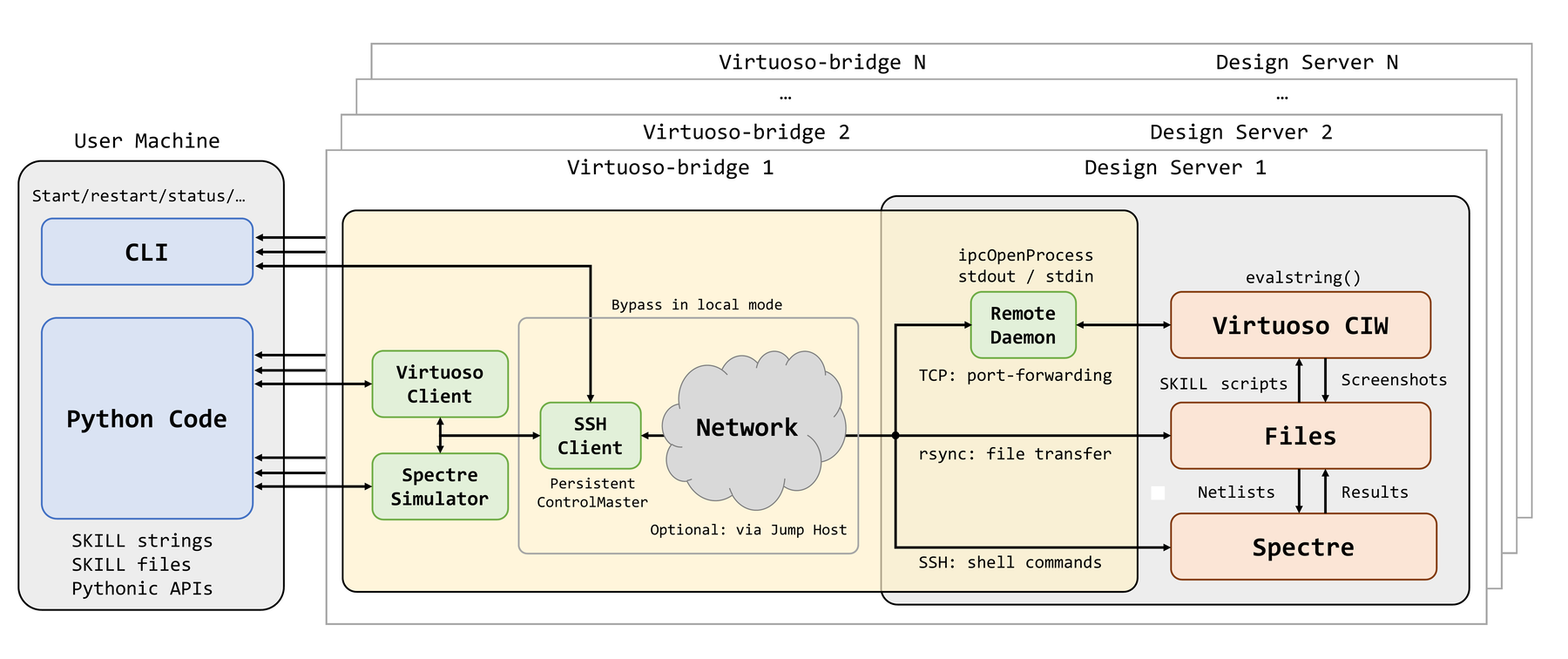
- VirtuosoClient: a plain TCP SKILL client. Sends SKILL as JSON and gets results; it knows nothing about SSH.VirtuosoClient:纯 TCP 的 SKILL 客户端,以 JSON 发送 SKILL 并取回结果,不关心 SSH。
- SpectreSimulator: runs standalone Spectre locally or over SSH and parses PSF ASCII results into Python data.SpectreSimulator:在本机或经 SSH 运行独立 Spectre,把 PSF ASCII 结果解析成 Python 数据。
- SSHClient: resolves the GUI, deployment, daemon and Spectre host roles, keeps a standalone port forward to the daemon host, and runs role-specific commands and transfers over OpenSSH or Paramiko. Skipped in local mode.SSHClient:解析 GUI、部署、daemon、Spectre 各主机角色,维持到 daemon 主机的独立端口转发,并通过 OpenSSH 或 Paramiko 执行各角色的命令与文件传输。本机模式下不使用。
VirtuosoClient works with any TCP endpoint (SSH tunnel, VPN, LAN or local), and each profile manages its own tunnel to a separate server. To see the raw mechanism, start with ramic_bridge.il and bridge.py.VirtuosoClient 可连接任何 TCP 端点(SSH 隧道、VPN、局域网或本机),每个配置各自管理到一台服务器的隧道。想看底层机制,从 ramic_bridge.il 和 bridge.py 读起。
Citation引用
If you use Virtuoso Bridge in academic work, please cite:如果在学术工作中使用了 Virtuoso Bridge,请引用:
@article{zhang2025virtuosobridge,
  title   = {Virtuoso-Bridge: An Agent-Native Bridge for Remote Analog and Mixed-Signal Design Automation},
  author  = {Zhang, Zhishuai and Li, Xintian and Sun, Nan and Jie, Lu},
  year    = {2025}
}
Authors: Zhishuai Zhang, Xintian Li, Nan Sun and Lu Jie, Tsinghua University.作者:Zhishuai Zhang、Xintian Li、Nan Sun、Lu Jie(清华大学)。